LED Keyboard: RGB Themes
- 4.7
- Rating
- 5.00M
- Installs
- Free
- Price
 Analysis by App-foxy
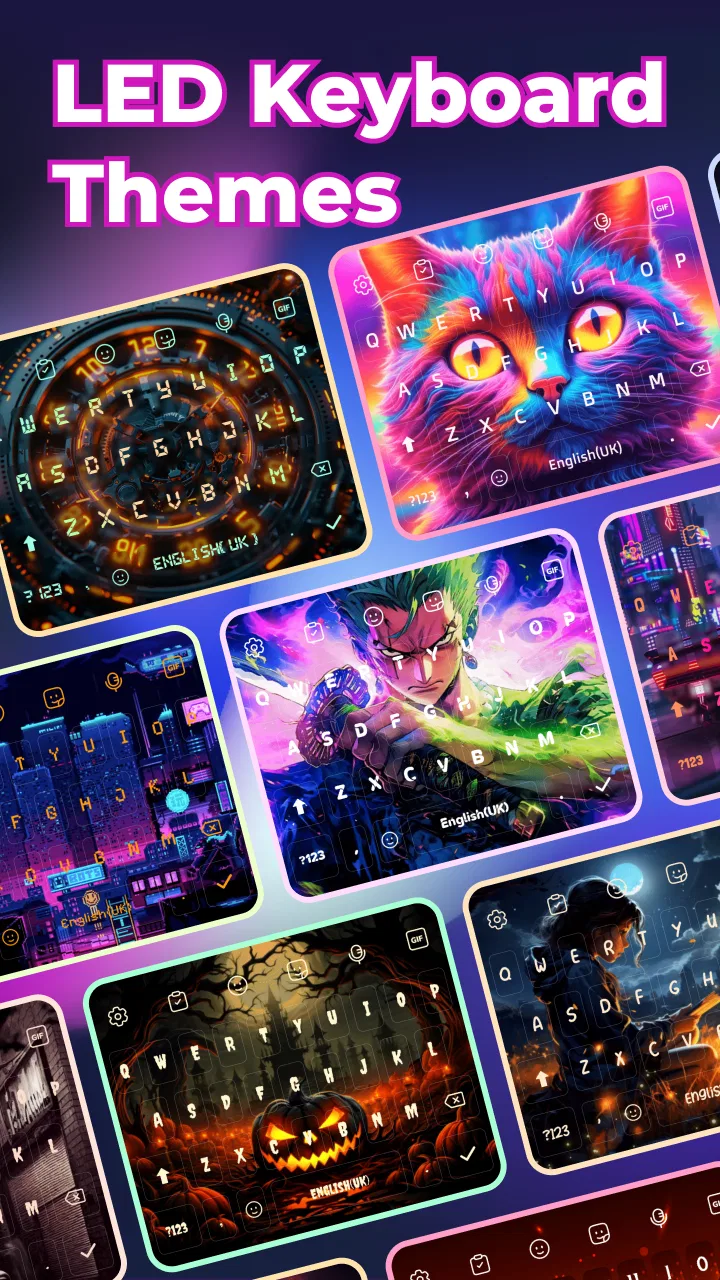
I usually notice a keyboard app only when it gets in the way: keys feel dull, the layout is awkward, or I keep making the same typing mistakes. LED Keyboard: RGB Themes takes a different starting point. It treats the keyboard as part of the phone’s visual style, adding colorful lighting, decorative fonts, emojis, and high-definition themes while still serving as the tool I use for everyday messages. After spending time with it, I see the appeal clearly: it can make a familiar Android screen feel more personal without asking me to replace the entire launcher or redesign every app.
This is a free personalization app from highsecure, rated for Everyone. It has passed the one-million-install mark and holds a 4.8 average from roughly twenty-three thousand ratings, which suggests that the bright visual approach has found a substantial audience. The app was released on December 10, 2024, and the current version is 1.8.7. Optional purchases range from $0.99 to $22.99 per item, so the free starting point is useful, but I would still check the cost of any premium-looking item before building a complete setup around it.
From a plain keyboard to a finished everyday setup
I start this section with a practical question: does the finished keyboard feel like a natural part of my phone, or merely a theme I enjoyed choosing? I look at how color, legibility, and the rest of my everyday setup work together, then consider a simple way to make future changes less distracting.
You May Also Like

 Blood Strike: 2.5 Anniversary
Blood Strike’s Loadouts Turn Every Drop Into a Tactical Gamble
A close look at Blood Strike’s custom loadouts: how fast access to signature weapons reshapes its battle royale rhythm, rewards preparation, and narrows the gap between fights.

 Pandora - Music & Podcasts
Pandora’s Music Is Easy to Start, but Harder to Recover
Pandora’s strength is its low-effort path from a seed to a station. Its weak spot is how much confidence it asks you to place in connection, setup, and quiet recovery.

 8 Ball Pool
 Is Built on Rivalries, Rematches, and Routine
A close look at the rivalries, rematches, shared routines, and unanswered safety questions that turn a quick pool match into a persistent mobile community.

 Samsung Music
’s Quiet Strength Is Playing What You Already Own
Its reach comes less from spectacle than from dependable access to a personal library. That simplicity is both the app’s strongest retention engine and its ceiling.

 AccuWeather: Weather Radar
AccuWeather Review: A Quick, Clear Forecast for Everyday Decisions
For everyday plans, the best forecast is the one you can understand quickly. AccuWeather makes rain timing, radar, and local conditions easy to act on, with a few trade-offs.

 Hill Climb Racing
Why Hill Climb Racing Still Turns Crashes Into One More Run
A tiny car, a bumpy hill and one more upgrade: Hill Climb Racing keeps resurfacing because its simple chaos makes every near-miss feel personal.
More From Our News Desk



Starting with the problem I actually wanted to solve
My starting condition was simple: the standard keyboard worked, but it looked disconnected from the rest of my phone. I wanted something more expressive for casual conversations, especially when sending messages where a little color or a playful typeface feels appropriate. I was not looking for a full productivity suite, a new writing assistant, or a replacement for a serious multilingual typing tool. That distinction matters, because this app is strongest when the keyboard is part of the phone’s personality rather than the center of a demanding writing workflow.
The first useful decision is to choose the kind of change I want. A bright RGB effect makes the keyboard stand out immediately, while a quieter theme can improve the appearance without turning every message into a visual event. Fonts shift the mood further, and emoji access is more practical than decorative because it affects how quickly I can express reactions. I found it better to begin with one clear goal instead of trying to combine every visual option at once.
For someone who changes wallpapers often, the app is especially interesting because the keyboard can become a matching detail rather than a permanent centerpiece. A colorful theme may work well with a gaming-style home screen, while a restrained design is easier to live with during work messages. That flexibility is more valuable than the novelty of simply having glowing keys.
The setup flow and the first handoff
The main workflow moves from selection to activation. I browse the available appearance choices, decide whether I want RGB lighting, a font treatment, emojis, or an HD theme, and then move toward using that design while typing. The important handoff happens when the chosen keyboard becomes the input method I use inside other apps. This is where a customization tool has to stop being a gallery and become a dependable everyday keyboard.
I recommend testing the result in a low-pressure conversation first. I type a few short messages, switch between letters and numbers, try punctuation, and open the emoji area before using the design for something important. This small check catches the most common source of frustration: a theme can look excellent in a preview but feel distracting or less readable once I am typing quickly.
The visual choices also deserve a practical review. A highly animated or strongly contrasted style may be attractive at first glance, but I prefer a theme where the characters remain easy to distinguish at a quick glance. The keyboard occupies a large part of the screen, so even a minor readability issue becomes noticeable after several messages. My advice is to judge the keys at the brightness and size you normally use, not only while browsing the theme collection.
Using it during a normal day
A realistic example is an evening group chat. I might start with a bright theme for casual messages, use the emoji panel to react without writing a full sentence, and then switch to a simpler appearance before replying to a work contact. That sequence shows the app’s main strength: personalization can follow the situation. I do not have to make the entire phone playful just because I want a more expressive keyboard for one conversation.
Another useful routine is creating a temporary style for an event or hobby. If I am chatting about a game, music, or a personal project, a themed keyboard can make the interaction feel more cohesive. When the novelty wears off, I can return to a calmer option without changing the rest of the device. This is a better use of the app than treating one dramatic design as a permanent choice.
The font feature is where I would be most selective. Decorative lettering can be fun in informal messages, but it may be less suitable when the recipient needs to read quickly or copy text. I would keep an ordinary-looking option ready for addresses, instructions, schoolwork, and professional conversations. The app is therefore most useful when I treat its styles as context-dependent tools rather than as a single identity for every sentence I type.
Where the keyboard meets other apps
The handoff from this personalization app to messaging, notes, search, and social apps is the real test. A keyboard theme is not useful if I only enjoy it in the settings screen. In practice, I want the chosen layout and appearance to remain comfortable while moving between different text fields. I also want the emoji and font choices to be available when the conversation changes direction, rather than forcing me to reopen the customization process each time.
This is also the point where I would compare it with the usual alternatives. A default system keyboard is generally the safer choice for people who prioritize familiarity and minimal visual distraction. A feature-heavy keyboard focused on predictions, translation, or advanced text editing may be better for long writing sessions. LED Keyboard: RGB Themes is aimed at a different preference: I am choosing it because the keyboard should look distinctive, not because I need a deep writing toolbox.
That comparison prevents disappointment. If my main problem is repeated spelling errors, slow cursor control, or professional document editing, appearance alone will not solve it. If my main problem is that the standard keyboard feels bland and impersonal, this app addresses that complaint directly. The right choice depends less on the number of themes and more on whether visual customization is genuinely important in my daily typing.
Small workflow tips that make the result better
My first tip is to separate discovery from commitment. I can browse several designs, but I should use one for a complete message before deciding it is a keeper. This reveals whether the letters remain clear, whether the colors become tiring, and whether the visual effect still feels pleasant after the initial surprise.
My second tip is to keep a practical fallback in mind. When a decorative font slows me down, I would rather return to a simpler style than force myself to use it everywhere. A keyboard is an input tool first, so comfort should win whenever appearance and speed conflict. This is particularly important for people who type with one hand or rely on quick replies.
My third tip is to treat emoji access as part of the workflow rather than merely another decoration. In short messages, an emoji can replace a full response, but searching for one can also interrupt the conversation. I find the feature most useful when I already know the kind of reaction I want and use it to finish a message quickly, rather than browsing endlessly through visual choices.
A fourth consideration is spending discipline. Because the app is free to start and includes individual in-app purchases, I would test the free experience before buying a collection. The right question is not whether a premium theme looks impressive in isolation, but whether I will still use it after the first week. For a personalization app, a small, frequently used improvement is more worthwhile than a large collection that remains untouched.
What the finished result feels like
When the workflow succeeds, the outcome is subtle but satisfying. The keyboard no longer feels like a generic panel that appears beneath every conversation. It becomes a small part of the phone’s visual identity, with enough control to match a mood, a wallpaper, or a particular kind of chat. I especially like that the change is visible during the moment I am actually interacting with the device, rather than only on the home screen.
The app also suits people who enjoy customizing their phones but do not want to spend time rebuilding the whole interface. A keyboard theme gives an immediate result with less commitment than changing icons, widgets, launchers, and wallpapers together. For younger users and anyone who enjoys colorful digital accessories, the Everyone age rating makes the app broadly approachable, while the free entry point makes experimenting easier.
Its popularity and high average rating make sense to me because the benefit is easy to understand. I do not need to learn a complicated system to see what has changed. The result is visual, immediate, and easy to reverse. That simplicity is a strength, especially for someone who wants a more personal phone without a long setup project.
Where the flow breaks down
The first friction point is the difference between a theme preview and real typing. A design can be attractive while still making letters harder to scan, especially when the lighting and font styling compete for attention. I would not assume that the most dramatic option is the most usable one. The keyboard needs to work in dim rooms, bright outdoor conditions, and rushed conversations, not just look good while I am choosing it.
The second break occurs when decorative choices meet serious communication. A playful font may be unsuitable for a form, a delivery instruction, or a message where exact wording matters. In those situations, a conventional keyboard is the better option. This does not make the app poor; it simply defines its role. It is a personalization layer, not a universal answer to every typing need.
The third issue is that switching between styles can become a chore if I change preferences too often. The app is most enjoyable when I settle on a few dependable looks and use them intentionally. Constantly searching for a new theme can turn a relaxing customization feature into maintenance. I would rather have one readable daily design and one or two special options than repeatedly rebuild the keyboard before every conversation.
There is also a trade-off between visual ambition and battery-conscious simplicity that some users may notice as a general principle, even though my own decision would depend on how the chosen style behaves on the device. If I want the least distracting, most predictable input experience, the standard keyboard remains the sensible benchmark. This app earns its place when the appearance change matters enough to justify trying something different.
Who should install it, and who should skip it
I would recommend LED Keyboard: RGB Themes to someone who sees the keyboard as part of phone customization, enjoys RGB-style visuals, and wants fonts, emojis, and HD themes in one focused experience. It is also a good fit for people who like changing their phone’s mood without committing to a full launcher overhaul. The free starting point gives curious users room to explore before deciding whether optional purchases are worthwhile.
I would be more cautious if typing accuracy, advanced writing assistance, or a familiar minimalist layout is my priority. Someone who writes long documents on a phone, depends heavily on specialized language tools, or dislikes visual effects may be happier with the keyboard already built into the device or with an alternative centered on productivity. The same is true for anyone who finds decorative fonts difficult to read; no theme is worth slowing down every message.
My final view is positive, with a clear condition: choose it for personality, not for features it is not designed to provide. In my experience, the best result comes from selecting a readable theme, testing it in real conversations, keeping a simpler style available, and treating purchases as optional rather than necessary. Its real value is the handoff from customization to comfortable everyday typing.
For me, that makes LED Keyboard: RGB Themes an enjoyable personalization app rather than a replacement for every kind of keyboard. It turns an overlooked part of the phone into something expressive, gives casual messaging more character, and offers enough flexibility to fit different situations. The flow breaks when style gets in the way of clarity, but with a little restraint, the app delivers exactly the kind of small, visible change many Android users are looking for.
FAQs for LED Keyboard: RGB Themes
01What customization options does LED Keyboard: RGB Themes offer?
LED Keyboard: RGB Themes provides a wide variety of customization options, allowing users to change keyboard backgrounds, key colors, and effects. You can choose from numerous RGB lighting themes to personalize your typing experience. The app also offers a theme editor for more detailed customization, ensuring your keyboard looks exactly how you want it.
02Is LED Keyboard: RGB Themes compatible with all devices?
The app is designed to be compatible with most Android and iOS devices. However, it's always recommended to check your device’s operating system version to ensure compatibility. The app performs best on devices with the latest updates, so keeping your OS current is advisable for optimal performance.
03Does LED Keyboard: RGB Themes affect battery life?
While LED Keyboard: RGB Themes is designed to be efficient, the use of dynamic themes and lighting effects may slightly impact battery life, especially if used extensively. Users concerned about battery consumption can opt for simpler themes or adjust the animation settings to reduce energy usage.
04How does LED Keyboard: RGB Themes handle user privacy?
User privacy is a top priority for LED Keyboard: RGB Themes. The app does not collect any personal data without consent. It operates under strict privacy policies, ensuring that any data collected is used solely to enhance user experience and is never sold or shared with third parties.
05Are there any in-app purchases or ads in LED Keyboard: RGB Themes?
LED Keyboard: RGB Themes is free to download and use, but it does include in-app purchases. These purchases allow access to premium themes and additional customization features. The app also displays ads, although users can opt for a paid version to remove advertisements and enjoy an uninterrupted experience.
Pros
- Custom RGB patterns enhance typing experience.
- Wide range of themes for personalization.
- User-friendly interface is easy to navigate.
- Supports multiple languages seamlessly.
- Low battery consumption compared to similar apps.
Cons
- Some themes require in-app purchases.
- Limited customization for key shapes.
- Occasional ads disrupt user experience.
- Not all features available offline.
- May slow down older devices slightly.

LED Keyboard: RGB Themes
Gallery